The spreadsheet pools the generators.
A 4N/3 plant does not. The engine loses the utility and each set in turn and reports what every remaining set actually carries — on the drawn paths, not on a sum.

Data center engineering simulation
Build the single-line diagram, simulate failures and maintenance, assess redundancy, compare brownfield upgrades and generate engineering-ready reports — from one connected model. Built for consultants, designers and operators.
Portable Windows desktop application · no installer · 34 MB · 5-day free trial · runs locally, projects stay on your disk
Both utilities carry the 400 kW IT load, 50 % on each cord. Generators on standby, tie open.
Illustrative sequence in the application’s drawing language. Screenshots of the software itself are further down.
ONE MODEL, SIX ACTIVITIES
The single line you draw is the model the simulator runs, the analysis reads, the comparison diffs and the report prints. Change the drawing once and every result follows.
SLD · one model feeds every step — there is no export and import between them.
WHY IT EXISTS
Load lists and capacity spreadsheets do not know how the plant is connected. The engine does: it walks the paths you drew and shows what each source carries when one of them is gone.
A 4N/3 plant does not. The engine loses the utility and each set in turn and reports what every remaining set actually carries — on the drawn paths, not on a sum.
Open any device, fail any component, and watch the transfer happen over time: which UPS goes to battery, which set starts, what is left on the bus after it settles.
Existing and proposed are the same model. The same fault runs on both; the capacity left in every reused item and the Tier checks that change state are the case for the works.
CORE CAPABILITIES
Power from the utility to the rack cord, cooling from the chiller to the aisle — modelled together, because a Tier check that ignores the pumps is not a Tier check.
41 component types from MV intake to rack. Switchboards carry their devices as ways with IEC 81346 designations, frame and trip settings, spares included.
Q-A1 … Q-B53 numbered in one clickUtility loss, load-demand generator start, UPS runtime, static bypass, breaker operations and EPO — played over time on the live diagram.
Transfers timed, batteries drained, failed sets skippedThe kW on every run: dual cords split 50/50 and the survivor takes 100 %, paralleled sets share the bus, a UPS draws its output over its efficiency. N+1 judged on the drawn paths.
Overload trips when a source is held above ratingRows, aisles, containment, perforated tiles and room units placed to scale, tied to the same components as the single line. See which rows lose containment first.
Continuous-cooling checks name the pumps, not only the CRAHsCapture the facility as it stands, draw the works. Retained, removed and new are worked out by comparison; capacity, redundancy and topology checks are reported before and after, per phase.
Existing → proposed, from one modelUPS, battery, generator and cooling sizing, cable sizing to IEC 60502-1 / IEC 60364, a bill of quantities counted from the model, and a document-numbered design report.
Every quantity read from the drawing, never typed twiceSTRAIGHT FROM THE SOFTWARE
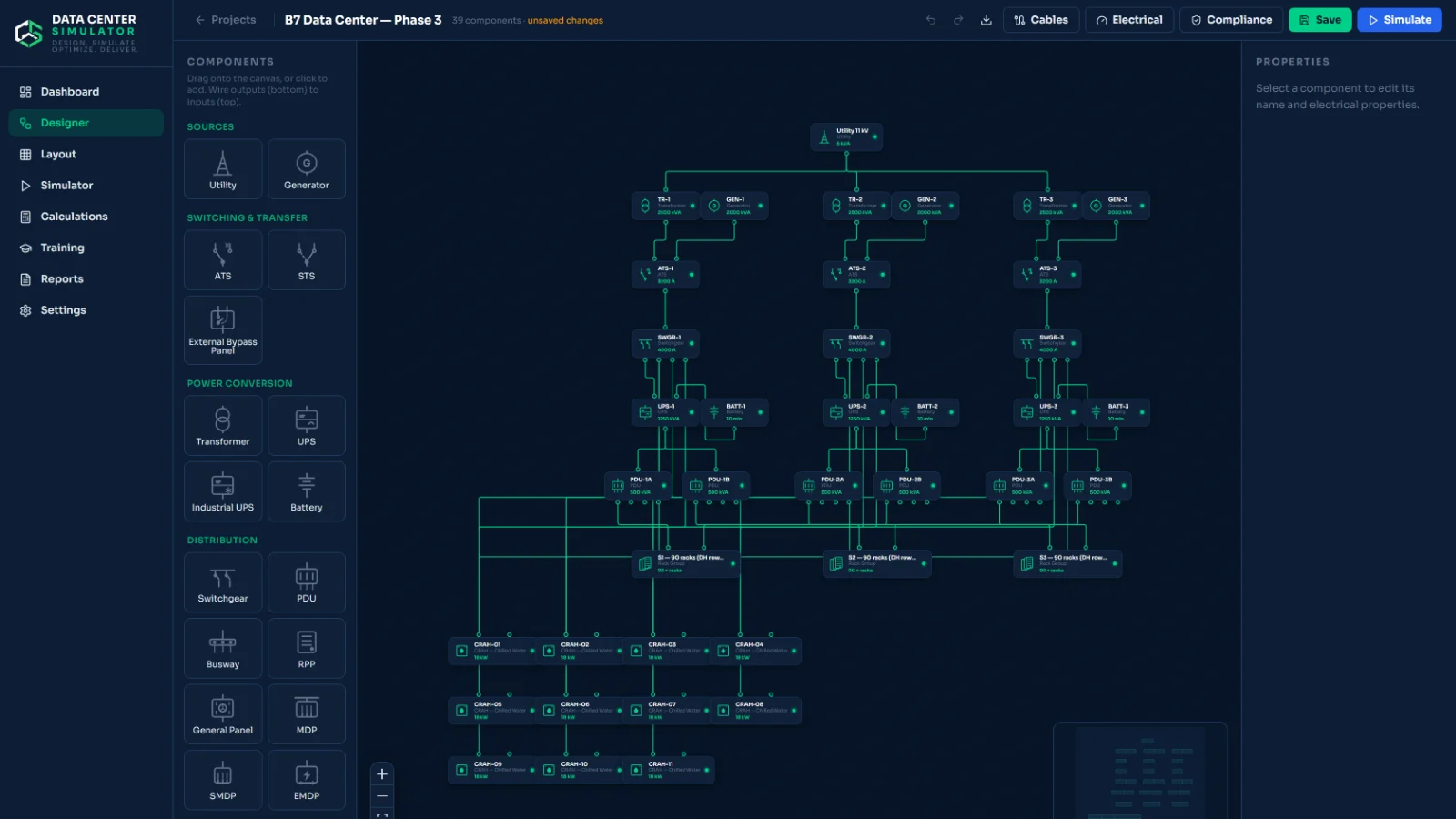
Unedited captures. Pick a workspace to see it at full size.
FROM LIVE TENDERS
Each one was checked against a consultant’s actual drawing or sheet before it shipped. How, is in the validation section.
Devices numbered as on the drawing, IEC 81346, one click per side.
116 designations reproduced from one drawingCases played by the engine; every Q device ON, OFF, FAULT or ISOLATION once the plant settles.
36 / 36 cases matched on a consultant’s sheetThe kW on every run and the loading of every source, with overload trips.
Distributed-redundant plants judged by losing the utility and each set in turn.
3N/2 and 4N/3 without poolingSets start in priority order until capacity covers the load; a failed set is skipped.
Set-mounted breaker as a device of its ownChilled-water pumps on uninterruptible power, or a thermal store for the restart.
The pumps are named in the findingWHO USES IT
Consultants
Designers and integrators
Operators and owners
BROWNFIELD RENOVATION
A hall being extended, a plant being reused, a live facility taken from one Tier to the next without going dark. The software holds the facility as it stands beside the one you propose and reports the difference.
WORKED EXAMPLE · ILLUSTRATIVE FIGURES
Existing facility
Proposed
What the workspace reports
Read the reference: taking an existing data center to Tier III →
STANDARDS AND TOPOLOGY ASSESSMENT
Set a target Tier. The engine traces the topology you drew and lists the checks that pass, the ones that fail and where the gap is — N, N+1, 2N and distributed redundancy detected from the drawing, not from a box you ticked.
UPTIME INSTITUTE TIER TOPOLOGY · TARGET
Target Tier topology checks: concurrent maintainability, fault tolerance, continuous cooling, and the residual redundancy after each case in the Sequence of Operation.
ANSI/BICSI 002 AVAILABILITY CLASS
Automated topology gap analysis across electrical, mechanical, telecommunications and fire subsystems; the weakest subsystem sets the class.
APPLICABLE CODES AND STANDARDS REGISTER
76 normative documents grouped by what they govern — grounding, batteries, fire, cabling — printed into the report as a register for sign-off. Included in the trial; printed only from the licensed edition.
ENGINEERING VALIDATION
Real consultant drawings are reproduced in the software, their sequence-of-operation sheets are played by the engine, and the state of every device is compared with the sheet. Where they disagree, the engine is fixed or the discrepancy is documented.
Client references and named case studies are published here as projects complete and clients agree to be named.
OUTPUTS
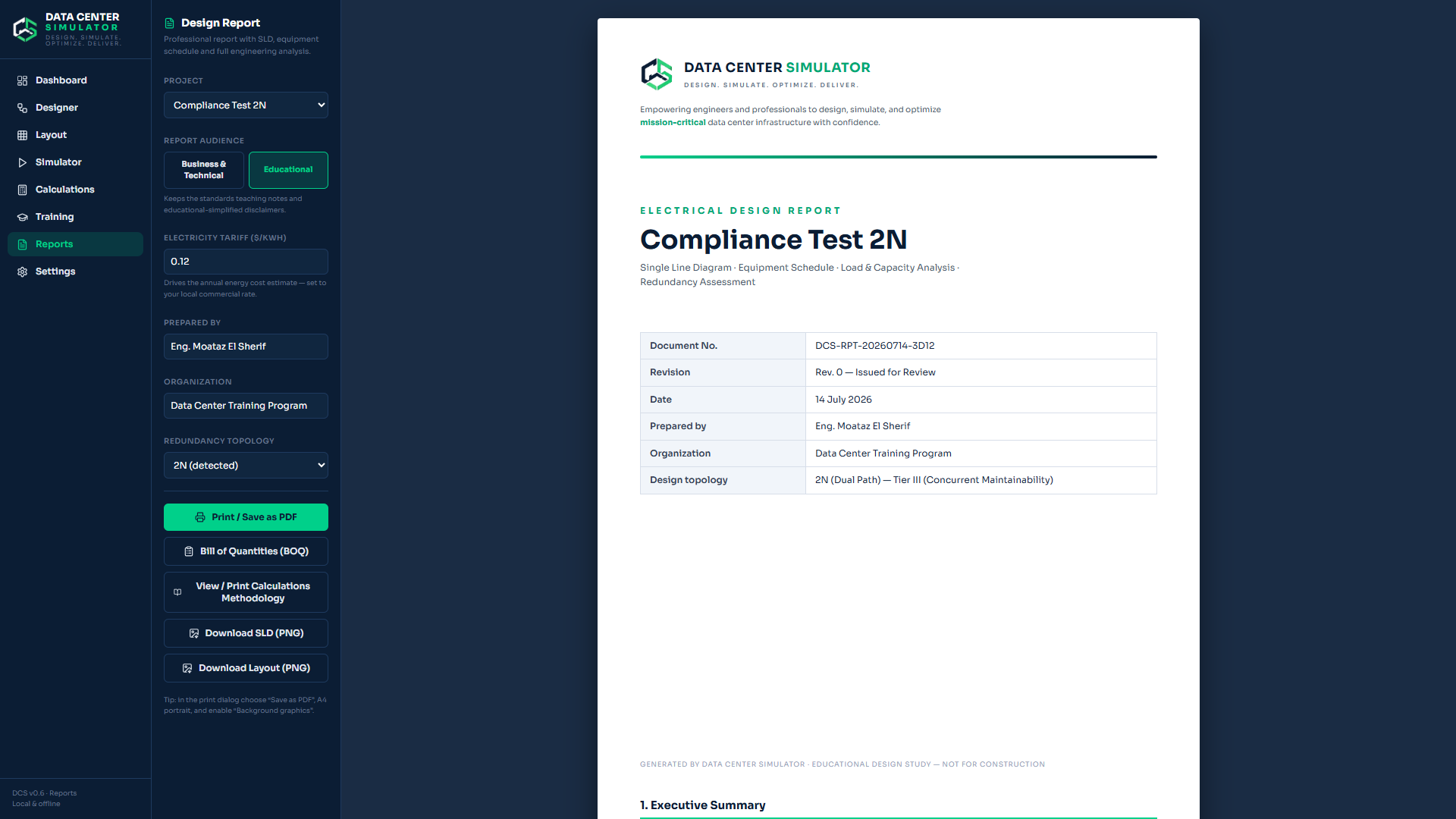
Nothing is typed twice. Change the drawing and every document below is regenerated from it.
LOCAL OPERATION
A facility’s single line is sensitive by nature. The software never asks you to upload it.
GET IT
Portable Windows desktop application. No installer required. Runs locally and opens its interface in your browser.
SELF-SERVICE
One project of your own for five days: draw the single line, fail anything in the simulator, lay out the floor and read the Tier verdict. Reports, export and the advanced workspaces come with the licence.
Download the free trialTALK TO AN ENGINEER
Thirty minutes on your own drawing with the engineer who built the software: what it will and will not tell you about your plant.
LICENSED EDITION
The complete edition is sent with your key. Open it, copy the Machine ID it shows, send it over; the key comes back for that computer.
Send my Machine IDThe file is not yet code-signed, so Windows may warn about an unknown publisher on first run: choose More info → Run anyway.
LICENSING
A term, not a subscription: nothing renews on its own. Prices in USD.
01 · TRY IT
The core of the product for five days, on one project.
No key · no account · 5 days from first launch
Download the free trialMOST CHOSEN
02 · FOR WORKING ENGINEERS
Every feature, one computer, the engineer who built it on the other end of the line.
Card payment · key within one working day
Buy Professional03 · TEAMS AND INTEGRATORS
Several computers, a perpetual term, or a licence shaped around how your practice works.
Quoted per seat · invoiced
QUESTIONS
No. The software is an independent engineering tool. It assesses the topology you draw against Tier criteria configured in the software and lists the checks and gaps. Certification is granted only by Uptime Institute; nothing here replaces it or any other formal review.
No. Design, simulation, assessment and reports all run on your own machine. The licence key is checked offline against the computer’s Machine ID. The only connection you need is the one to download the file.
Nothing. It is one portable Windows executable (Windows 10 or 11, 64-bit). Double-click it, it starts a local service and opens its interface in your browser. Projects are kept in a database on your own disk.
The file is not yet code-signed, so Windows may warn about an unknown publisher on first run: choose More info → Run anyway. The file is the same one served from this site; if you would rather have it sent directly, ask.
The core of the product, on one project of your own, for five days from the first launch on that computer: the single-line designer, the failure simulator, the floor layout and thermal map, and the Tier and Class verdict. The sequence of operation, renovation, calculations, BOQ, the detailed compliance checks and codes register, reports, printing and export come with the licence — they are not in the trial file at all. When the five days are up the software shows your Machine ID and a Buy button; the projects you made stay on the computer and open in the licensed edition once the key is entered.
Yes. Send the new Machine ID and the replacement key is issued free for the remainder of the term.
A design report (PDF), the Electrical Sequence of Operation sheet (print and Excel), a bill of quantities, switchboard schedules, the codes register, the renovation comparison and an SLD export. Case files can be moved between projects.
The engineer who built the software, on WhatsApp or by email. There is no ticket queue.
NEXT STEP
Download the trial and draw a facility you know. Or ask for a walkthrough and bring your SLD.
61 Ismail Kamel St., Helwan, Cairo, Egypt
Trial edition · 5 days · Windows · 34 MB
One field. Company is optional. We follow up once, by a person, and for nothing else.